What No One Tells You Before Downloading the App
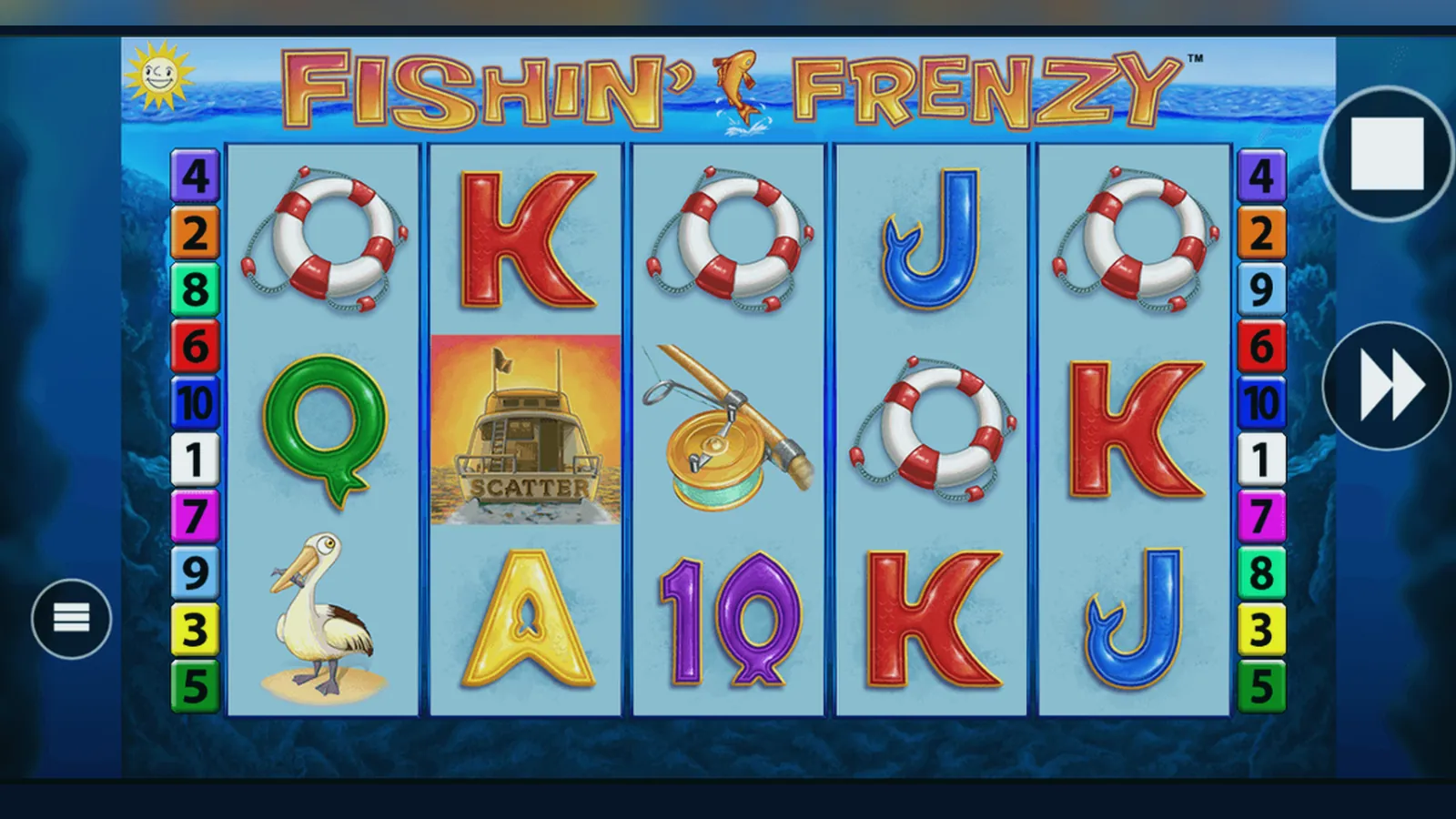
Most people tap «Install» without checking whether the app they're downloading is the real thing or a clone pushing adverts. The official Fishin' Frenzy slot doesn't live in a standalone app—it runs inside your casino operator's platform, which means the download path is different from what you expect.
Here's what actually happens in the first ten minutes, the first hour, and the first week after you install. We'll cover the four install routes—browser bookmark, add-to-home-screen web app, operator's native app, and APK files—then show you how to spot fakes and which permissions should raise a red flag.
The Store Card You Won't Find in the App Store
Fishin' Frenzy isn't published as a standalone app. Blueprint Gaming, the developer, licenses the slot to casino operators who bundle it into their own platforms. That means you're downloading an operator's app—not a «Fishin' Frenzy» app. Here's what the game listing looks like inside a typical operator's catalogue:
The operator's app will ask for camera access (for document uploads during KYC), location services (to confirm you're in the UK), and notifications (for bonus offers and responsible-gambling reminders). Requests for contacts, microphone, or SMS are red flags—no legitimate casino needs those.
First Ten Minutes: Install Paths and What Each One Costs You
There are four ways to get Fishin' Frenzy on your phone. Each has a different install time, data cost, and risk profile. Here's the step-by-step for each, in order of safety:
- Browser bookmark (safest, zero install): Open your operator's site in Chrome or Safari, navigate to Fishin' Frenzy, tap the share icon, choose «Add to Home Screen». The icon appears on your home screen but it's just a bookmark—the game runs in your browser. No permissions, no storage, no background processes. The downside: you need a stable connection and the site checks your location every session.
- Progressive Web App via «Add to Home Screen» (recommended): Some operators serve a PWA version. Same steps as the bookmark method, but the app caches 35–50 MB of game assets after the first load. You'll get offline access to the demo mode and faster load times. The operator's site will prompt you to allow notifications—say no unless you want bonus alerts. Risk: minimal, as PWAs run in a browser sandbox.
- Operator's native app from Google Play or App Store (most common): Search for your operator's name—not «Fishin' Frenzy»—in the store. Check the developer name matches the operator and the licence number in the footer of their website. Download size: 60–120 MB. The app will ask for camera (for ID upload), location (UKGC compliance), and notifications. First launch requires age verification before you see any games. Risk: low if the operator is in the UKGC register; high if you downloaded a lookalike.
- APK from a third-party site (highest risk, not recommended): Android lets you sideload apps outside Google Play. Some offshore sites offer «casino APKs» that bundle slots, including Fishin' Frenzy clones. Steps: enable «Install unknown apps» in Settings > Security, download the APK, open the file, confirm install. Risk: these apps are unlicensed, often contain adware or spyware, and aren't protected by GAMSTOP. You're also outside UKGC oversight, so no deposit limits, no KYC, and no legal recourse if the site vanishes with your balance.
First Hour: What the App Actually Does (and What It Checks)
Once installed, the operator's app runs a sequence of checks before you can deposit. Here's the timeline:
- Minutes 0–5: Age verification. You'll enter your name, date of birth, and address. The app cross-checks this against the electoral register and credit-reference databases. If the check fails, you'll need to upload a photo of your passport or driving licence. This is a UKGC requirement—every site does it.
- Minutes 5–15: Affordability screening (initial tier). The operator pulls your credit file to estimate disposable income. If your net deposits in the past month are under £150, you proceed. Above that, expect a questionnaire about your income and housing costs. Some operators pause the account until you provide payslips or bank statements.
- Minutes 15–30: Payment method registration. You can link a debit card (Visa or Mastercard), PayPal, Apple Pay, or Open Banking via Trustly. Credit cards have been banned for gambling since 2020, so if the app accepts one, it's either a mistake or an unlicensed site. The app will verify the card is in your name by charging and refunding £1.00.
- Minutes 30–60: First deposit and demo toggle. You can now deposit (minimum £10.00 at most operators) or play Fishin' Frenzy in demo mode. Demo uses virtual credits and runs the same RNG as real-money play—same RTP, same volatility—but you can't withdraw demo winnings. Many UKGC sites restrict demo access to logged-in, age-verified accounts to comply with under-18 protection rules.
The app also installs a session timer. After 60 minutes of continuous play, you'll see a reminder showing your net win or loss and prompting you to take a break. You can dismiss it, but the timer resets and returns every hour. This is part of the safer-gambling toolkit required by the UKGC.
First Week: Version Updates, Screen Descriptions, and What Changed
The operator's app updates automatically if you're connected to Wi-Fi. Blueprint pushes slot updates every 4–6 weeks, and operators fold those into their app releases. Version 2.14.0 (released 12 January 2026) brought three changes:
- Faster load time for the free-spins bonus round (reduced from 3.2 seconds to 1.8 seconds on 4G).
- A new «History» tab in the game menu showing your last 50 spins, including stake, result, and timestamp. Useful for tracking your session, but it's stored locally—if you delete the app, the history goes with it.
- Updated paytable to reflect the £5 and £2 stake caps by age. If you're 18–24, the app now blocks stakes above £2.00 across all slots, including Fishin' Frenzy, following the UKGC's October 2025 rule change.
Here's what you'll see across the app's main screens:
- Game lobby: a grid of slot thumbnails with a search bar and filters for provider, volatility, and RTP. Fishin' Frenzy sits in the «Popular» and «Blueprint Gaming» categories. Tap the thumbnail to load the game or tap the info icon for the paytable.
- Game screen: the 5×3 reel grid with the fishing boat at the top, stake selector at the bottom-left, spin button bottom-right, and balance display top-right. The autoplay and settings icons sit next to the stake selector. In portrait mode, the reels take up 70% of the screen; landscape gives you more space but hides the balance unless you tap the top bar.
- Bonus-buy menu (where available): a pop-up showing the cost to trigger free spins directly. This feature is banned in the UK—if your app offers it, the operator is either unlicensed or the geo-blocking failed. Close the app and report it to the UKGC.
- Deposit screen: lists payment methods with processing times (e-wallets: a few hours to 24 hours; Faster Payments: same day to 2 working days; debit card: 1–3 working days). You'll also see your daily, weekly, and monthly deposit limits, which you set during onboarding or adjust in account settings.
- Account screen: shows your balance, pending withdrawals, bonus wagering progress, and links to transaction history, KYC uploads, and self-exclusion tools. The GAMSTOP link is here—one registration blocks every UKGC-licensed site for 6 months to 5 years.
How to Spot a Fake and Which Permissions Are Red Flags
Fake casino apps are common in third-party stores and APK repositories. They clone the Fishin' Frenzy artwork, mimic the UI, and either serve rigged games or harvest your payment details. Here's how to identify them before you install:
- Check the developer name in the store listing. The app should be published by a licensed casino operator (e.g., «BetVictor», «Grosvenor Casinos»), not «Fishin Frenzy Ltd» or «Blueprint Games Official». Blueprint licenses the slot; they don't publish consumer apps.
- Look for the UKGC licence number in the app's description or the operator's website footer. Cross-reference it in the UKGC register. No licence number = unlicensed site, and your deposits aren't protected.
- Read the permissions list before installing. Legitimate casino apps need: camera (for ID upload), location (to confirm you're in the UK), notifications (optional, for bonuses). Red flags: contacts (no reason to access your address book), microphone (gambling apps don't use voice), SMS (phishing risk), phone state (used to track device ID for ad networks).
- Check the install count and reviews. Real operator apps have 100,000+ installs and a mix of 3–5 star reviews mentioning KYC delays, withdrawal times, and customer service. Fake apps have <10,000 installs, generic 5-star reviews («best game ever»), and complaints about broken withdrawals or forced ad views.
- Launch the app and try to deposit. If the app accepts credit cards, it's unlicensed—credit cards have been banned for gambling in the UK since April 2020. If the app skips age verification or lets you play before uploading ID, it's not UKGC-compliant.
If you've already installed a suspicious app, delete it immediately and change your passwords. If you deposited, contact your bank to dispute the transaction and report the app to the UKGC via their online form. Unlicensed operators can't be forced to return your balance, so prevention is the only real protection.
FAQ
Can I play Fishin' Frenzy offline after installing the app?
Only the demo mode works offline, and only if the operator's app is a progressive web app that caches game assets. Real-money play requires a live connection for RNG, balance updates, and UKGC compliance checks. If the app lets you spin for real money without a connection, it's either caching results (which would be illegal) or it's a fake.
Why does the app need my location if I've already verified I'm 18 and in the UK?
The UKGC requires continuous geo-verification to prevent play from restricted regions. The app checks your location each session using GPS, Wi-Fi network data, or IP address. If you're travelling outside the UK, the app will block real-money play until you return. Demo mode usually stays available.
What's the difference between the app and playing in a mobile browser?
The native app loads faster after the first launch (cached assets) and supports biometric login (Face ID, fingerprint). The browser version requires no install and uses less storage, but you'll re-enter your password more often and load times are slightly longer. The game itself—RTP, volatility, features—is identical in both.
If I delete the app, do I lose my balance and bonus progress?
No. Your balance, wagering progress, and transaction history live on the operator's servers, not your phone. Deleting the app only removes local data like saved login and spin history. Reinstall the app or log in through a browser and everything will still be there. If you've self-excluded via GAMSTOP, though, you won't be able to log back in on any UKGC-licensed site until the exclusion period ends.